

Introduction
The podman vs docker conversation has shifted from "which one has more features" to "which architecture actually fits how modern teams build and ship software." Docker popularized containers with a centralized daemon model that made sense a decade ago, but Podman's daemonless, rootless approach was designed from scratch for the security and orchestration demands that define container workflows today. Most engineers who have only worked inside Docker's ecosystem underestimate how deep the architectural gap runs, and that gap has direct consequences for everything from CI pipeline design to production security posture. The difference is not cosmetic; it changes how processes are owned, how containers survive restarts, and how your stack interacts with Kubernetes.
Key Takeaway: Docker relies on a privileged, long-running daemon to manage all containers, while Podman runs each container as a direct child process under the invoking user, eliminating the single point of failure and the root-privilege attack surface that Docker's architecture inherently carries.
The Core Architectural Split: Daemon vs. Daemonless
Every meaningful difference between Docker and Podman traces back to one design decision: whether a central daemon brokers all container operations. Understanding this split is the prerequisite for evaluating security, performance, and orchestration fit.
How Docker's Daemon Model Works
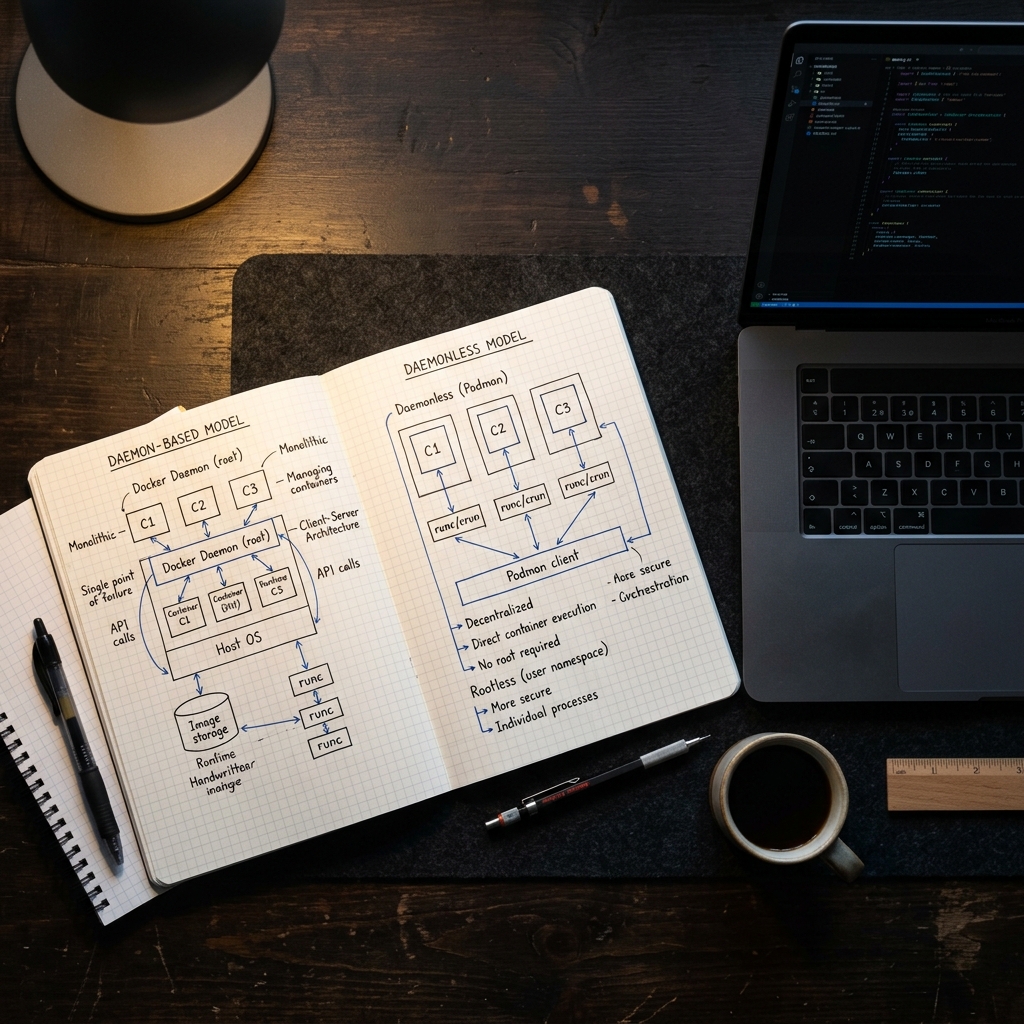
Docker runs a persistent background process called dockerd that listens on a Unix socket. Every CLI command, every API call, and every container lifecycle event routes through this single daemon running as root. That centralization made Docker easy to adopt early on, but it introduced a structural tradeoff that engineering teams now have to account for.
Single point of failure: If the Docker daemon crashes, every running container loses its parent process and can become orphaned or unresponsive
Root privilege requirement: The daemon runs as root by default, meaning any exploit that reaches the daemon socket has elevated privileges across the entire host
Socket exposure risk: Mounting the Docker socket into a container (a common pattern in CI systems) effectively grants that container root-equivalent access to the host
Restart fragility: Upgrading or restarting the daemon requires careful orchestration to avoid disrupting running workloads
How Podman Eliminates the Daemon
Podman takes a fundamentally different approach. There is no long-running background process. When you run a container with Podman, it forks directly as a child process of your shell session, managed by the Linux kernel's standard process tree. This means each container's lifecycle is tied to the user session that launched it, not to a shared privileged service. The container runtime comparison becomes clear here: Docker adds an intermediary layer between you and your containers, while Podman removes it entirely.
This daemonless design also means there is no socket to expose, no privileged process to protect, and no single service whose failure cascades across all running containers. Each container is independently managed, which aligns naturally with how distributed systems are expected to behave.
Security and Production Implications
Architecture is not an abstract concern. The daemon vs. daemonless distinction has concrete, measurable effects on how secure your container stack is and how confidently you can run it in production environments where compliance and isolation matter.
Rootless Containers and the Attack Surface Question
Podman was built rootless from the ground up. Containers run under the invoking user's UID namespace, meaning a container escape does not grant root access to the host. Docker added rootless mode later as an optional configuration, but it remains a bolt-on rather than a default, and many Docker workflows still assume root-level daemon access. For teams operating under strict security requirements, the difference between "rootless by default" and "rootless if you configure it" is significant.
The podman rootless containers model also simplifies multi-tenant environments. On shared build servers or CI runners, each user's containers are fully isolated at the process level without requiring additional tooling or custom security policies. Docker achieves similar isolation only through careful daemon configuration and group permission management, which introduces operational overhead that scales poorly across large engineering teams.
Systemd Integration and Process Management
One of Podman's most underappreciated advantages is its native integration with systemd. Because Podman containers are regular processes, they can be managed directly by systemd unit files. You can generate a systemd service from a running container with a single command, giving you restart policies, logging, and dependency management through the same tooling that manages every other service on a Linux host. This podman systemd integration removes the need for a separate orchestration layer in environments where Kubernetes is overkill.
Docker's daemon model, by contrast, manages container restarts internally. That works fine until the daemon itself needs to be restarted, upgraded, or crashes unexpectedly. At that point, the restart policies Docker manages become irrelevant because the process responsible for enforcing them is the one that failed. Podman sidesteps this entirely by delegating process supervision to the operating system itself.
Kubernetes Alignment and Orchestration Fit
The container tools your team uses locally should mirror how containers behave in production orchestration. This is where the architectural philosophies of Docker and Podman diverge most sharply in practical terms.
Pods as a First-Class Concept
Podman's name literally comes from "Pod Manager." It natively supports the concept of pods, grouping multiple containers that share network namespaces and storage, which maps directly to Kubernetes pod semantics. You can define, run, and test multi-container pods locally using Podman and then generate Kubernetes YAML from them. This tight alignment means the mental model you use during local development matches what happens when those containers reach a cluster. Teams evaluating toolchains that scale from development to production find this alignment reduces friction significantly.
Docker does not have a native pod concept. Docker Compose fills a similar role for local multi-container orchestration, but Compose files are a Docker-specific abstraction that requires translation before reaching Kubernetes. That translation step introduces drift between what you test locally and what runs in production, which is exactly the kind of gap that causes subtle, hard-to-diagnose deployment failures.
Docker Compose Compatibility and Migration Realities
A common concern when evaluating docker vs podman is whether existing Docker Compose workflows will break. Podman now supports Docker Compose files through podman-compose and, more recently, through direct compatibility with the docker-compose binary by emulating the Docker socket. Most standard Compose files work without modification. The edge cases tend to involve features that depend on Docker-specific networking plugins or volume drivers that have no direct Podman equivalent.
For teams considering migration, the practical path is straightforward. Podman's CLI is intentionally Docker-compatible; most commands are identical. Many teams start by aliasing Docker to Podman in their shell and running their existing workflows unchanged. The places where things break, usually around development environment, networking, or daemon-dependent CI integrations, surface quickly and are well-documented. DevvPro has covered the practical migration steps in detail for teams making this transition.
Performance and Developer Experience
Architecture affects daily workflow speed and resource consumption. The performance characteristics of each tool matter most in CI pipelines and on developer laptops where resources are constrained.
Runtime Performance Differences
In raw container runtime performance, Podman and Docker are nearly identical because both use the same underlying OCI-compliant runtimes (typically runc or crun). The container itself does not know or care which tool launched it. Where performance differences emerge is in startup latency and resource overhead. Podman's daemonless model means there is no persistent process consuming memory when containers are not running. Docker's daemon, even idle, holds open file descriptors, maintains internal state, and consumes a baseline of CPU and memory. On a developer laptop running Docker Desktop, this overhead is noticeable. The performance benchmarks consistently show Podman's cold-start advantage in environments where the daemon is not already warm.
For CI pipelines specifically, Podman's architecture eliminates the need to run a privileged Docker daemon inside a container (the "Docker-in-Docker" pattern), which simplifies pipeline security and reduces the resource footprint of each build agent. Teams running hundreds of concurrent builds see meaningful savings from dropping the daemon requirement.
When Docker Still Makes Sense
Docker's ecosystem maturity remains a genuine advantage. Docker Desktop provides a polished GUI experience on macOS and Windows that Podman Desktop is still catching up to in terms of plugin ecosystem and third-party integrations. If your team relies heavily on Docker-specific extensions, build caching optimizations tied to BuildKit, or commercial Docker features like Scout vulnerability scanning, switching to Podman introduces friction that may not be worth the architectural benefits.
Docker also has deeper integration with many commercial CI/CD platforms. GitHub Actions, GitLab CI, and CircleCI all assume Docker as the default container runtime. While Podman works in these environments, it often requires additional configuration. For teams where the developer tools need to "just work" across a heterogeneous set of platforms, Docker's ubiquity is a practical asset that architectural purity does not automatically outweigh.
DevvPro's editorial position is that the best container runtime depends on what you are optimizing for. If security isolation, Kubernetes alignment, and daemonless operation are priorities, Podman is the stronger architectural choice. If ecosystem breadth, GUI tooling, and zero-configuration CI compatibility matter more today, Docker remains a defensible default. The important thing is making that choice deliberately, based on an actual audit of your stack, not out of inertia.
Conclusion
The Docker daemon vs. podman distinction is not a minor implementation detail. It is a foundational architectural decision that shapes your security posture, your CI pipeline design, your Kubernetes readiness, and how your containers behave when things go wrong. Podman's daemonless, rootless model was designed for the constraints that modern engineering teams actually face, while Docker's daemon model carries legacy tradeoffs that increasingly require workarounds. Evaluate both tools against your team's actual production requirements, not against feature checklists, and the right choice will be obvious.
Explore more container tooling deep dives and engineering guides on DevvPro.
Frequently Asked Questions (FAQs)
Why is Podman rootless by default?
Podman was designed from the start to run containers under the invoking user's UID namespace, eliminating the need for a privileged daemon and reducing the host attack surface by default.
Can Podman replace Docker in production?
Yes, Podman is production-ready and used in enterprise environments, though teams should verify compatibility with any Docker-specific networking plugins or volume drivers their workflows depend on.
How does Podman differ from Docker architecture?
Docker routes all container operations through a centralized root-privileged daemon, while Podman runs each container as a direct child process of the user's session with no intermediary daemon.
Does Podman support Docker Compose files?
Podman supports Docker Compose files through podman-compose and through Docker socket emulation that allows the standard docker-compose binary to work with Podman.
How does Podman handle container networking?
Podman uses CNI plugins (and increasingly Netavark) to manage container networking, providing bridge, macvlan, and host networking modes similar to Docker's networking stack.
Is Podman better than Docker for Kubernetes?
Podman's native pod concept and ability to generate Kubernetes YAML directly from running pods make it architecturally closer to Kubernetes semantics than Docker's Compose-based workflow.
What are Podman's limitations compared to Docker?
Podman's ecosystem is smaller, its desktop GUI is less mature than Docker Desktop, and some commercial CI platforms require extra configuration to use Podman as the default runtime.